
Step 01
🎧 Setup
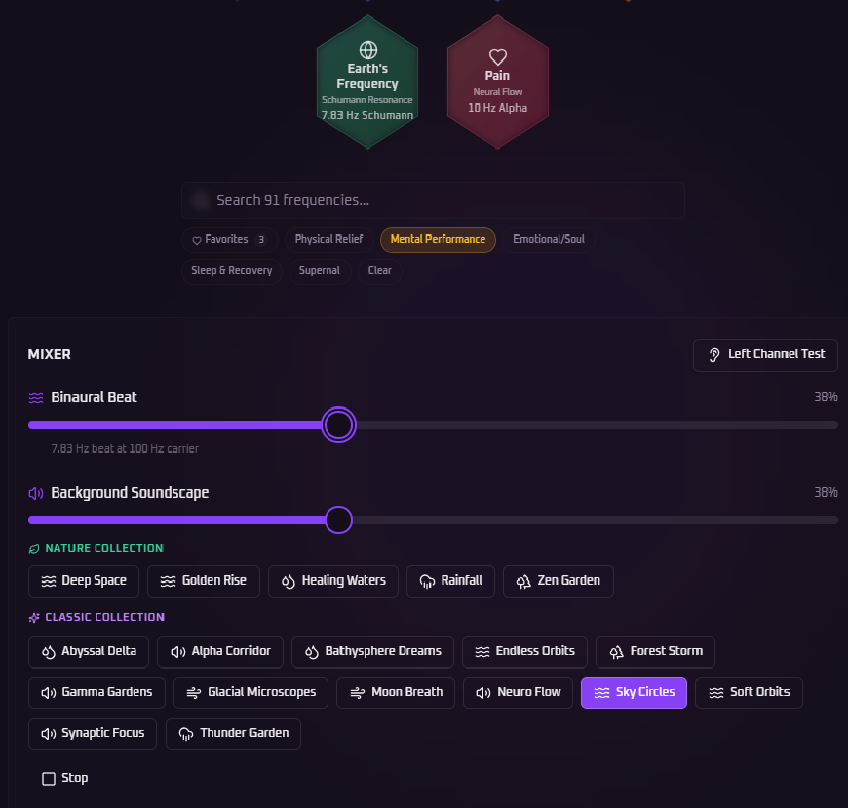
Use stereo headphones. Binaural beats only work when each ear receives a separate frequency — headphones deliver that split-channel signal directly to your brain. Earbuds work too, but over-ear headphones give the deepest effect.
Find your Center of the Head. Once your session starts, turn the volume up until you feel the sound shift from your ears to the center of your skull. That's the binaural beat forming inside your brain — that's where the therapy happens. Settle into that sweet spot.
Use the Volume Mixer to balance your binaural tone against your chosen background soundscape. Most users keep the tone at 40–60% and the soundscape slightly lower.
Hardware that delivers the signal cleanly
Binaural beats only fire when the Left and Right channels stay completely separate until they reach your brain. Avoid single speakers, soundbars, or any "Mono" audio setting on your phone. Beyond that, your gear choice shapes how deep the entrainment goes.
🎚️ Open-Back (Best)
Open-back headphones let the .WAV transients breathe and protect the 0.01 Hz precision — recommended for serious Gamma (40 Hz) sessions. Look at Sennheiser HD, Beyerdynamic, or AKG.
👂 Earbuds (Sealed)
A snug silicone or foam tip preserves the bass pressure wave that Delta (1.5 Hz) and Theta (4.5 Hz) need. Disable "Spatial Audio" or "360 Reality Audio" — both remix channels and break the binaural effect.
🔌 Wired vs Bluetooth
Wired is zero-latency, zero-compression — always best. Bluetooth only matches it with aptX HD or LDAC codecs; standard Bluetooth softens the 528 Hz and 111 Hz protocols.
Plug in your hardware, play any preset, and listen for L/R isolation — the tone should appear only in the left ear, then only in the right. If you hear it in both simultaneously, your phone is in Mono and the therapy will not work.
Step 02
🔬 Why Lossless .WAV, Not MP3
MP3 compression uses temporal masking — it smears the sharp edges of every sound wave to save file size. That destroys the precise phase relationships binaural beats depend on. We refuse to ship MP3 anywhere in HertzboxPro.
What our engine preserves
The HertzboxPro .WAV Engine protects the Initial Transient Attack of every oscillation — the exact moment the wave begins, which is where entrainment lives.
What that gives you
Bit-perfect timing at a 0.01 Hz margin, phase-locking that reduces neural noise, and clinical-grade synchronization your brain can actually follow.
Step 03
✦ The Free 5
Your account includes five hand-picked frequencies — one for each of the most common wellness needs. No subscription required.
Delta waves guide your brain into its deepest restorative state. Start a session as you lie down — let the frequency do the rest.
Deep Theta waves slow the nervous system, quieting racing thoughts and creating a soft, safe inner calm.
Beta waves sharpen attention and executive function — use before work, study, or any task requiring sustained concentration.
Schumann Resonance — reconnects you to Earth's natural electromagnetic pulse. Ideal for stress recovery and feeling centered.
Alpha waves interrupt pain signaling pathways, providing natural relief without medication. Best used with eyes closed.
Step 04
📲 Installing the App
The Hertzbox Pro Engine is a Progressive Web App (PWA) — no App Store, no download file needed. It lives directly on your device and works offline, launching instantly like a native app.
🍎 iPhone (iOS / Safari)
🤖 Android (Chrome)
🖥️ Desktop (Windows / Mac / Linux)
Chrome or Edge
Safari on Mac (Sonoma+)
Requires macOS Sonoma (14) or newer for Safari.
✓ Once installed, the app works offline and launches instantly — just like a native application.
Step 05
🔓 Unlock the Pro Library
One lifetime purchase. No subscription. No recurring fees. Pay once and own the full library across all your devices — forever.
To unlock, go to your Profile inside the app and tap Upgrade to Pro. Here's what's waiting for you:
Target the body directly. The legendary 528 Hz Solfeggio (DNA Repair) works at the cellular level to promote tissue healing and molecular restoration. Paired with binaural carriers tuned for inflammation, chronic pain, nerve function, and immune response — this category is your body's reset button.
Unlock your cognitive edge. Beyond the free 14 Hz Focus preset, the Pro library adds frequencies tuned for deep flow state, accelerated learning, working memory, problem-solving, and creative output — engineered for students, creators, and high performers.
Heal what logic can't reach. Frequencies in this category are calibrated for processing heartbreak, recovering from burnout, releasing grief, and activating an abundance mindset. The 10 Hz Alpha foundation creates the emotional openness needed for deep inner work and energetic renewal.
Go deeper than the free Sleep preset. The Pro tier adds 2.5 Hz Delta for profound dreamless restoration, plus the 7.83 Hz Schumann Resonance for grounding and nervous system reset — the same frequency your body naturally syncs to when lying on the Earth.
The frontier of frequency therapy. This category explores advanced consciousness states — Brain Creativity frequencies for lateral thinking and inspired vision, DNA Integrity tones for deep energetic coherence, and specialized presets for expanded awareness, lucid dreaming, and peak meditative depth.
Step 06
🎙️Voice Tips
Tap the Voice Mode button on your dashboard, then tap the record icon and speak your symptom or goal clearly.
For best results:
- Say your symptom in a clear, steady voice (e.g., "focus", "insomnia", "anxiety")
- Speak in a quiet environment to improve accuracy
- Use single words or short phrases rather than full sentences
- Wait for the recording indicator before speaking
The app matches your spoken words against 100+ ailment keywords and automatically sets the optimal frequency and background soundscape.
Voice Mode is available for Pro users.
Step 07
🛠️Technical Fixes
- Check that your device is not on Silent or Mute mode
- Make sure your volume is turned up
- Try tapping the play button again — some browsers require a user interaction before audio can start
- If using Bluetooth headphones, ensure they are connected and selected as the audio output
- Open Settings > Safari > Microphone and ensure it is set to Allow
- When prompted by the browser, tap "Allow" to grant microphone access
- If you previously denied access, go to Settings > Safari > Clear History and Website Data, then revisit the app and allow microphone when prompted
- Ensure you have a stable internet connection
- Try refreshing the page or clearing your browser cache
- Use a modern browser (Chrome, Safari, Firefox, or Edge)
Step 08
⚠️Safety Warning
Important Safety Information
- Do not use while driving or operating heavy machinery
- Consult a doctor before use if you have epilepsy, a seizure disorder, or a pacemaker
- Discontinue use immediately if you experience dizziness, nausea, or discomfort
- Binaural beats are a wellness tool and are not intended to diagnose, treat, cure, or prevent any medical condition
- Keep volume at a comfortable level to protect your hearing
HertzboxPro is designed for general wellness purposes only. Always seek professional medical advice for health concerns.